

How to join a Minecraft Bedrock Server
When you created your server, you filled out some information about the server including the friendly address. This is one of the server addresses you can use to connect to your server. It may take a few minutes for it to work properly because it needs to reach your DNS server first.
Find your Server Address
- From the Servers page, click on "Manage" next to the server.
- There will be two server addresses: a Friendly Address and an IP Address. Copy one of these two addresses:
- Friendly: This address should look like this:
myfriendlybedrockaddress.g.akliz.net - IP Address: This address should look like this:
12.34.56.789
- Friendly: This address should look like this:
- Copy the server's Port. This should appear like this:
12345
Join your Minecraft Bedrock Server
-
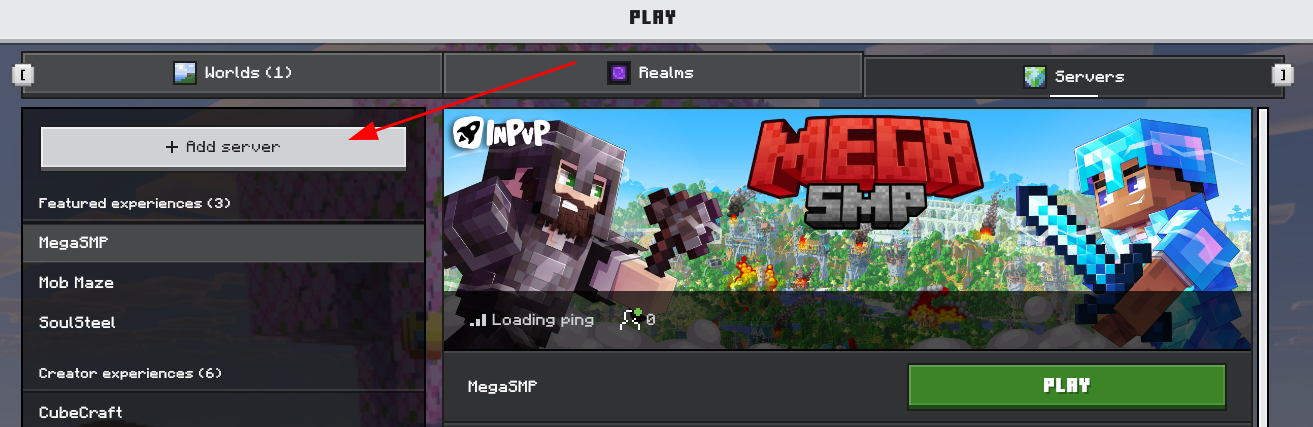
In your Minecraft client, click Play, then the Servers tab.
-
On the left panel at the top, click Add Server.
-
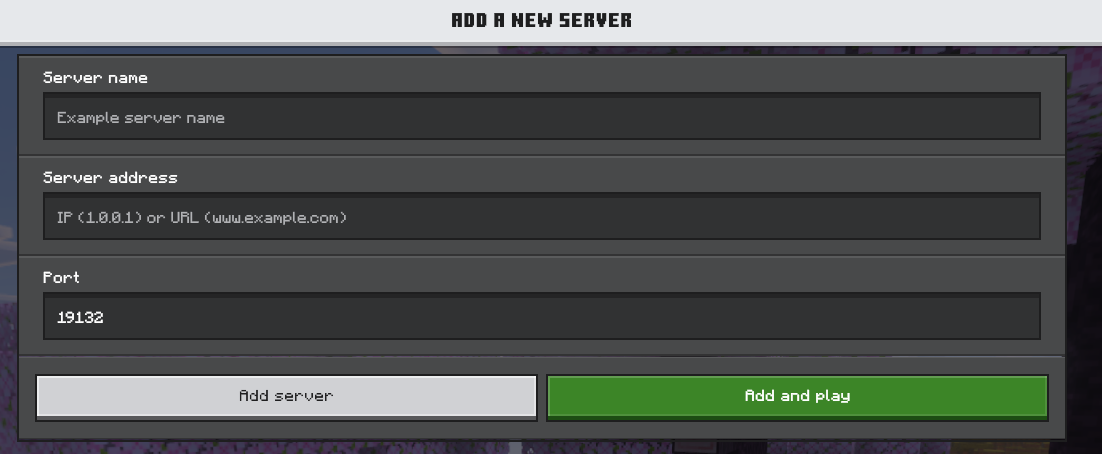
Fill out the server information
- Server Name - The name of the server. This can be whatever you want.
- Server Address - The Friendly or IP Address from the above section.
- Port - The Port from the above section.
-
Click on Save.
-
You should then be able to connect to your server and enjoy your game!
Updated 7 months ago
Did this page help you?