

Getting Started with Minecraft: Bedrock Edition
Why Host a Minecraft: Bedrock Edition Server?
Hosting your server with Akliz has several huge benefits over playing without a server, hosting yourself, and even hosting with another host.
- Performance: Using a dedicated server can drastically improve performance on your computer, since many of the game processes are offloaded from your computer to the server.
- Easy Control over gameplay settings and mods: With an Akliz server, you have full control over your game and modpack settings, as well as which mods your server runs.
- Opportunities to play with friends and build community: Having a server is great for playing with friends. The server can be online 24/7, so even when your computer is off, your friends can play. Growing an active community is easy when everyone has a server to hang out in!
- Simplify Your Server: Our in-house server management site, the Command Center, makes managing your server easy without restricting what you can do. Whether you're brand new to server hosting or a seasoned veteran, you will find our site easy to use and powerful at the same time.
- Reliable Backups: Included with all of our plans is our Vault system, which automatically makes backups of your server so you don't have to worry about losing your world if disaster strikes.
- No Hidden Fees: We charge you one price for your plan. There are no features locked behind a paywall, like mod support, storage space, automatic and manual backups, premium support chat, or anything else.
- Powerful Hardware: No matter what plan you choose, you get the same powerful server hardware. You don't have to pay extra to get the best we have to offer.

What You Need to Start Hosting Your Minecraft: Bedrock Edition Server
Before you get started, here are a few things you will need to play on your Minecraft server:
- Minecraft account: Ensure you own a copy of Minecraft: Bedrock Edition. Console players will be using Minecraft: Bedrock Edition, and PC players should ensure they are playing Minecraft: Bedrock Edition.
- Akliz Hosting Plan: Minecraft: Bedrock Edition requires a minimum of 500MB of RAM to run. Depending on the number of players, you may need a larger plan. Choose a suitable hosting plan based on your needs. Check out the pricing page here to purchase one, or contact support via the chat bubble on the bottom right of the site if you don't know which plan is right for you.
- Internet Requirements: Make sure you have a stable internet connection. Almost all broadband connections should be able to play easily. You can test your ping to our servers using our free sample servers here!
Step-by-Step Guide to Setting Up the Minecraft: Bedrock Edition Server
Step 1: Sign Up for Akliz Hosting
- Create an account here.
- Navigate to the Pricing Page and choose the plan that's right for you. You'll need a minimum of 500MB to run a Palworld server.
- Click "Buy Now" next to the plan you want.
- Take a look at everything in the Plan Overview section and make sure all of your choices look good. (Hint: you can get a discount by choosing a term for your plan longer than 1 month!)
- Click Next.
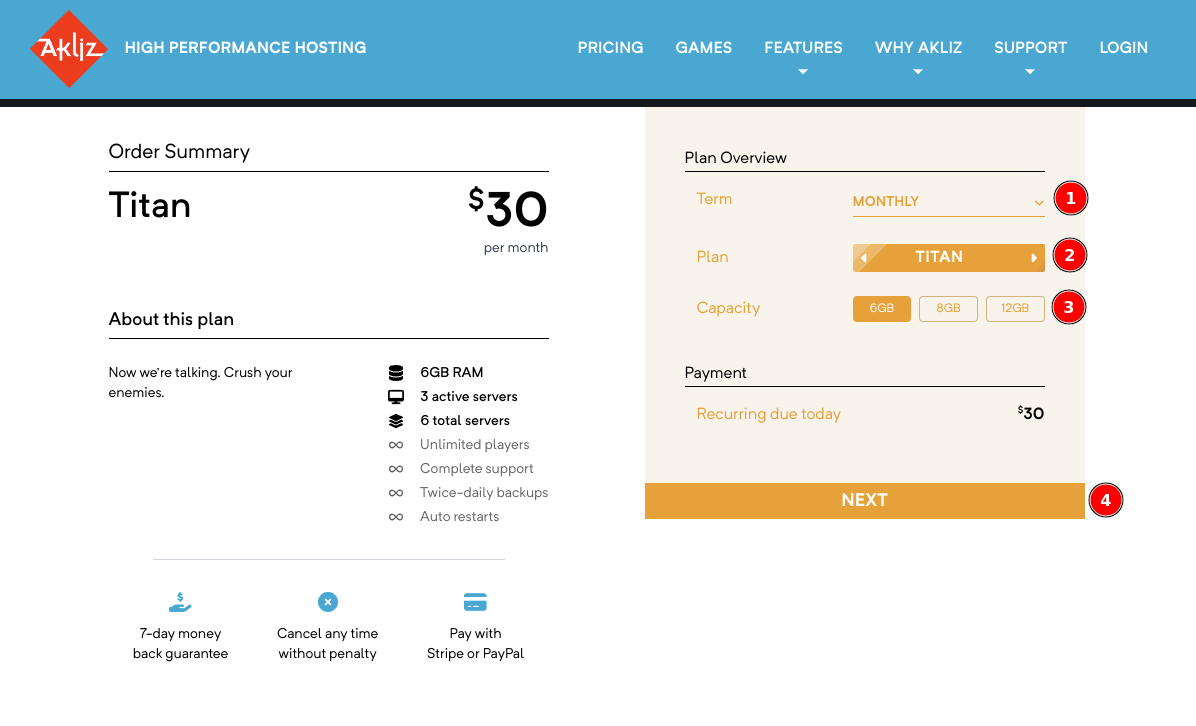
- Add a payment method. This can be a credit/debit card or PayPal.
- Click "Pay Now" to finalize your payment and start your plan!
Step 2: Access the Command Center
- Navigate to the Command Center and make sure you are still logged in.
- This will bring you to your Servers page. Here you will be able to see a list of any servers you have created.
Step 3: Create a New Minecraft Server
With any Akliz plan, once you have a plan you can start creating servers. These servers, when started, use your purchased RAM. You can see how much RAM you have used and available, as well as how many servers you can create and run on the left side of the Servers page.
- Now that you're in the Servers page, you should see a button at the top left labeled "Create a Server". Clicking that button will bring you to a list of games available for installation.
- Select "Minecraft Bedrock" from the list of available games.
- For normal vanilla Minecraft: Bedrock Edition, choose the Minecraft Bedrock option.
- On the next page, you will be able to create a friendly address that will be used to connect to your server. You can put anything you'd like here, as long as it's not already taken.
- In the same page, you can choose your RAM. The default is the minimum amount required for the game, but if you bought a plan with extra RAM, you can increase this up to the amount you purchased.
- Confirm the configuration and click "Create" to initialize the server.
- Once it is created, you can start your server by clicking the blue "Play" icon, or click on "Manage" next to your server to see the console and other info, and you can click "Start" at the top right of the page. Your server needs to be started before you can join.
Start Hosting your Minecraft: Bedrock Edition Server Today
Akliz offers tons of benefits over hosting locally or other solutions. Our Command Center is powerful and simple and lets you skip the nonsense and get straight to the game. Our hardware is some of the best in the business and our support is top notch. You can't go wrong, no matter what game you play.
If you want to host a server for another game, we let you switch games under a single plan, as long as you have enough RAM.
Updated 7 months ago